Learning from the real-world experiences of peers and innovators is one of the fastest ways to de risk digital patient engagement initiatives and accelerate results. By examining how similar organizations designed their strategies and iterated based on patient and staff feedback, healthcare leaders can sidestep common pitfalls. These lessons turn abstract best practices into concrete, repeatable actions that can be tailored to each organization’s population, resources, and goals.
This white paper provides guidance on both specific organizational approaches and on how to maximize the engagement-focused capabilities of QliqSOFT’s Digital Communication Platform, Quincy, to optimize engagement.
Patients of all ages increasingly expect healthcare communication to match the convenience they experience in other parts of their digital lives. Many patients now assume their providers will offer simple, mobile-friendly tools for secure two-way messaging and virtual visits, and they often judge an organization’s overall quality by how seamless these touchpoints feel.
Read Also: Silver Surge – The Rise of Texting Among Seniors
It is important to be clear about what successful engagement looks like. Data and goals are critical for assessing current performance and identifying the need for further improvement. Data also quantifies the outreach's impact, which will sustain support for the program and justify continued expansion.
QliqSOFT clients have demonstrated meaningful results from embracing best practices including:
Once you have decided to engage with patients digitally, what's next? Trust is the foundation of effective digital patient engagement because it determines whether patients will use and act on the tools organizations provide. When patients believe that digital channels are secure, accurate, and truly connected to their care team, they are more likely to share information, follow guidance, and adhere to treatment plans.
For organizations adopting proactive digital outreach for the first time, building patient awareness and trust is foundational to success. Trust begins with clearly communicating who you are and ensuring every digital interaction is secure. Here are strategies to increase success, patient trust, and engagement.
Start small. Target small, defined patient segments with highly personalized communications that map directly to your organization’s priorities. Here are examples.
| Type of Org | Organization Priority | Pick One Workflow to Change |
|---|---|---|
| Care-at-Home | Speed patient intake | Have one person on the intake team pilot sending out welcome chatbots that enable patients to escalate to staff to schedule a meeting. |
| Care-at-Home | Reduce readmissions | Have one person on the intake team pilot sending out welcome chatbots that enable patients to escalate to staff to schedule a meeting. |
| Care-at-Home | Reduce no-shows | Start with automated visit reminders and confirmations, then provide information on how to prep for the visit for one of your caregiver types (e.g., a case manager or social worker). |
| Value-based care | Close gaps in care | Start with one condition or gap. For example, outreach to hypertensive patients who were recently seen by their doctor to ask for a home blood pressure reading. |
| Value-based care | Prevent readmissions | Start with one condition that care managers are contacting for automated outreach at the time of discharge. |
| Outpatient Clinics | Have current insurance cards for all patients | Request new insurance card images for patients with a specific insurer that has dropped one service line. |
Start with something simple like insurance cards or focus on a specific sub population (reduce home health admissions for one interdisciplinary team) or workflow.
Collaboration between staff and support team members is critical. Staff input ensures that the technology supports, rather than competes with, the workflow. Support staff become deeply familiar with the workflow and technology. Inclusion of QliqSOFT on the team is important as they know the product capabilities and can guide both:
Involve staff in patient education and enabling them to reinforce the legitimacy of communications during patient interactions creates consistency that patients notice and appreciate. Provide patient-facing staff with talking points about your new digital communication program, including where they can direct patients with additional questions. Create posters and placards that describe your commitment to simplifying communication with patients.
Campaign timing is a major driver of patient engagement and staffing efficiency. Most patient responses arrive within the first two hours after a campaign is sent. Assign team members to answer patient inquiries and secure chats during this critical window, ensuring patients receive rapid responses.
Links sent around lunchtime (between 10:30 a.m. and 11:30 a.m.) and late afternoon (around 3:30 p.m.) generate the best response rates. These patterns allow operations leaders to align outreach schedules with staff when patients are most likely to read and respond.
Have staff use the opt-out report to identify and call patients who received the outreach but did not participate and ask those who opted out why they did so. Treat these conversations as qualitative research rather than failures.
If patients reported not understanding the message or were worried that the text might be spam, educate and invite them to opt back in. Use what you learn to modify message content. Streamline campaign wording to match the terminology of other familiar tools within the organization, so messages feel consistent with communications patients already know and trust.
It is critical to take an agile approach. Organizations that monitor their initial performance, learn from both their unengaged patients and staff feedback, and adjust achieve higher levels of patient participation and outcomes. They also learn important lessons that strengthen their muscle memory and skills, helping them succeed faster with their next outreach initiative.
The benefit of adopting a digital communication platform with robust no-code tools is the unlimited number of needs they can address. The most successful organizations have a defined, prioritized queue of needs to enable support teams to continue to deliver an ongoing stream of results.
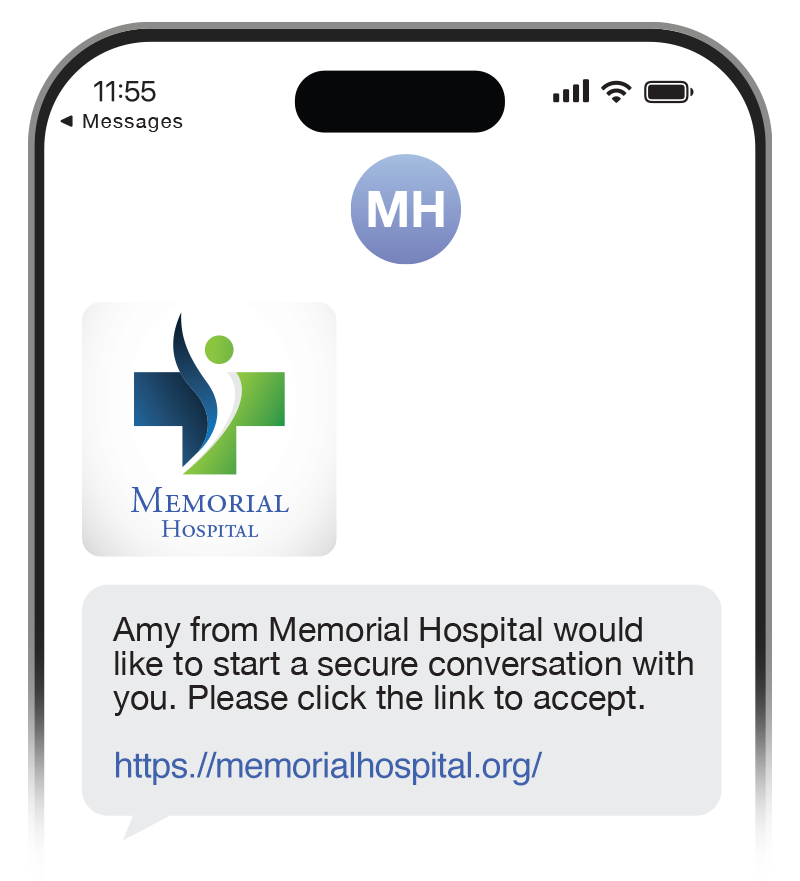
MMS (Multimedia Messaging Service) is a messaging technology that enables users to send multimedia content, including organizational logos via mobile phones, thereby extending beyond the text-only limitations of SMS (Short Message Service). Unlike SMS, MMS supports larger message sizes and richer content, making it more suitable for engaging communication. Seeing your organizational logo and a personalized message builds trust to click the link and enter the secure channel.
Adopting MMS and including your logo in outbound text messages conveys a sense of familiarity and increases response rates compared to simply sending a text message.
If sending emails, add your logo to the recipient emails. Personalize the email footer for your organization and include both email and phone contact information for individuals with questions. Ensure that the individuals responding to the email or phone number are aware of your digital communication program and can effectively address any questions.
Resist the temptation to use a generic statement for all text or email messages. Patients see them as spam and are unlikely to trust the message enough to click the link to open the secure channel.
Remember, this first message is not secure, so it may not contain any protected information
Personalized messaging that reflects a familiarity with the patient can more effectively engage patients and make them feel valued.
Look beyond simply providing the required data elements for each patient. Consider, for example, including the patient’s specific doctor or clinic name (if you have multiple) by using custom attributes in your message. Custom attributes enable organizations to provide additional optional information, such as a provider or care manager name, a specific clinic that they visit, that can be incorporated into messages and data capture. Consider the following options. Which would motivate you to respond?

The default URL used in widgets is a qliqsoft.com URL. Organizations can change the URL to one from their organization that will be more familiar to the patient. A custom URL:
To do this, you will need to involve the administrator of your organization’s DNS provider, create a subdomain dedicated to QliqSOFT, and coordinate with QliqSOFT to ensure it is working correctly. Contact support or your account lead for detailed instructions.
Offering opt-in choices empowers ownership, helping organizations build a foundation of digital trust that supports long-term engagement and improved care experiences. Using QliqSOFT’s Opt-in capability automatically generates editable fact sheets about the communication program and enables recipients to easily save the related contact information on their phones, ensuring that future messages are familiar and not treated as spam by mobile phones.
Opt-in is set at the widget level, so if an individual opts out of text messaging, it applies only to the topic addressed in that widget, not to all communications from your organization. If there is a question about why someone has not received a message from your organization, first check the SMS opt-out report to see if the individual is listed.
At times, a recipient will call the number in the text to check its validity. There is an option in the widget to set a phone number that will receive this call. Ensure that the individual(s) with that phone number are familiar with your digital communication plan and can confirm to the caller that the message is legitimate.
We also see instances where the patient responds to the text rather than clicking the link. Use the widget option to craft an autoreply that explains the purpose of the outreach and assures the patient that the message is legitimate.
An estimated 25.6 million people in the United States have limited English proficiency (LEP), which is roughly 8–9% of the population across hundreds of spoken and signed languages. Despite this prevalence, only 13% of healthcare organizations fully meet translation requirements.
Patients feel respected and heard when outreach is delivered in their own language, which builds trust, high satisfaction scores, and increases their willingness and ability to engage digitally with the care team.
Fortunately, real-time translation is increasingly being adopted by healthcare organizations. Patients are “generally positive” with AI translation, finding that communicating through machine translation was easy and that they are “willing to use the application again).
Successful digital patient engagement is about orchestrating a patient-centered ecosystem that is convenient, trustworthy, and easy to use for both patients and staff. Organizations that understand their populations, personalize outreach, and offer app-less, secure two-way communication can reduce friction, strengthen relationships, and measurably improve outcomes and operational efficiency. By applying the best practices in this white paper, healthcare leaders can move beyond portals and point solutions to deliver a seamless digital experience that patients adopt and recommend.


© 2026 QliqSOFT, Inc. All Rights reserved

