Resources / Product Release Notes
Product Release Notes: QliqCHAT, Quincy, Visit Path
What shipped, release by release.
Current release: October 24, 2026 · Quincy 26.4.2.1. Jump to a product below, or download any prior release from the archive.
Quincy 26.4.2.1 · October 24, 2026
Quincy
What's new
- ✓A refreshed, easier-to-read interfaceQuincy and QuincyCHAT adopt an updated design, with stronger contrast on buttons, form fields, and links and larger text in tables and forms. Patient Chat picks up the new fonts while keeping each widget's own branding colors.
Video Visits / Quincy Chat
Improvements
- ✓Emoji reactions on messagesAgents, patients, visitors, and other participants can react to any message with an emoji, in one-on-one and group conversations alike. A quick row offers recent favorites, with a full picker for anything else, and hovering or long-pressing a reaction shows who left it. Reactions never trigger notifications or mark a conversation unread, and they appear in conversation exports. Turned on per chat widget; off by default.
- ✓Everything shared in a conversation, in one placeA new attachments drawer in the conversation toolbar collects Quincy eSign documents, Quincy Forms, Quick Todos, Quincy Tasks, and media into tabs, newest first, with each item's status. Agents can open, download, or send a reminder straight from the list. Participants see the same drawer, limited to their own items.
- ✓Preview the chatbot before sending an invitationBefore inviting a patient, review the full chatbot conversation they'll see as a read-only flow, with every path and message, and filled in with that patient's own details such as their copay amount. Each chat widget can make the preview optional or a required step before the invitation can be sent.
- ✓SMS short codesPatient texts can now come from a dedicated short code instead of a full phone number, giving messages a cleaner, more recognizable sender. Patients can still reply, and opt-out and help requests are handled automatically. Available on request; a short code requires carrier approval before use.
- ✓Transfer to any chat widgetAgents can now transfer a conversation to any chat widget in the group, not just ones they belong to, so front-desk staff don't need to be added to every widget.
- ✓Resize the chat listDrag the divider between the chat list and the conversation to give either side more room. Your layout is remembered on that browser.
- ✓See how a visitor started a group conversationWhen a visitor starts a group conversation, they appear in Manage Participants with how they arrived (QR code, chat widget, or SMS) and when. Their details show the first message they sent, the widget, their device, and an approximate location.
Chatbots
Improvements
- ✓Crop images in the chatbot builderCrop and reposition an image when adding it to an Image step, so the important part stays in frame for patients.
Quincy eSign
What's new
- ✓Fill a document as a formSigners can now switch to a simple list of every field, grouped by page, instead of hunting through the PDF. Answers stay in sync between the form and the document, and each field can jump to its spot on the page. Templates can give fields a short description, shown in the signer's language. On a phone the form opens full-screen with its own Submit button. Works for every way a document is sent.
Improvements
- ✓Radio buttons and dropdowns in the template designerTemplates can now include radio groups, where the signer picks exactly one option, and dropdown fields. Both support required, labels, descriptions, and conditional logic. Agents' saved signatures now stay on their account across sessions and browsers, while patients' saved signatures are never kept on the device, for shared clinic tablets.
- ✓Signers see the document is loadingOpening a signing link now shows a loading indicator instead of a blank page. If the document can't load, the signer gets a way to retry.
- ✓Audit log grouped by signerOn documents with several signers, the audit log now groups each person's actions under their name instead of mixing everyone's together.
Bereavement Center
What's new
- ✓Two-way calendar sync for visitsConnect a Google or Microsoft calendar from Visit Scheduling. Your outside events show as busy time, with titles hidden, and visits you're booked on appear in your own calendar, including changes and cancellations. Sync can be paused anytime without disconnecting.
Improvements
- ✓Faster intake and more flexible outreachAdd bereaved contacts straight from an existing patient's saved relations, such as a spouse, caregiver, or proxy, picking one or several and reviewing their details before saving. Call and visit steps can now send a text or email you write yourself when someone can't be reached. Export a report for a single contact from their record. Care plan templates can be renamed, and contacts now show "Related to" instead of "Family of," since not every relation is family.
- ✓My Queue now shows who to callClaimed work in the Bereavement Center My Queue is now grouped by person rather than listed as separate, unidentified tasks. Each card leads with the contact's name and preferred name, a language tag when their preferred language isn't English, and their relationship to the deceased, with all of that person's open steps listed underneath and ordered by urgency. Every step shows its real due status ("Due today", "Due tomorrow", or how many days overdue it is) instead of a generic label, and Open plan is one click away. Claiming, logging a call or attempt, moving to tomorrow, and releasing now update the headline, tab, and overdue counts immediately and confirm the action with a short message, with released steps reappearing in the pool right away.
- ✓AI drafts on bereavement steps, in My Queue and the Plan of CareEvery open step now carries a one-line draft prepared for that kind of outreach: a call brief for calls, a brief plus a visit message naming real open appointment times for visits and video visits, a screening message for risk assessments, or a suggested note for mailings and other contact, with a lane-change summary alongside the suggestion whenever one is waiting to be applied. Expand the line to read the draft and its talking points, open View details for the full narrative, the facts behind it and how it was reached, refresh it, or generate a different kind on the spot. Steps without a draft offer a Prepare button that works at any time, and a draft that fails now says why and offers to retry where retrying helps. Drafts are shared between My Queue and the Plan of Care, and admins choose how far ahead drafts are prepared automatically in AI Assistant settings.
Visit Loop
What's new
- ✓Quincy Visit LoopA new program that closes yesterday's incomplete home-health visits every morning. In the morning, it finds visits that weren't confirmed, rescheduled, or documented, checks in with each staff member once, and closes every item with a verified record. Schedulers stop spending mornings on phone tag, and your EMR stays the system of record.
- ✓Morning SweepThe program's home screen shows the morning at a glance: what's open, what's been confirmed, and what needs a scheduler's attention, in priority order. Visit data is pulled from the EMR overnight and again just before the sweep, so the list is current when the day starts.
- ✓One check-in a morning for each staff memberEach person gets a single message covering everything outstanding from yesterday, never a stream of reminders. It arrives first in QliqCHAT as an interactive card, and falls back to a text later if there's no answer. Nothing is sent during quiet hours or on non-business days. Staff answer in a tap, and when nothing is outstanding they get an all-clear instead.
- ✓Every visit closes the same morningEach unconfirmed visit ends as confirmed, confirmed by a contracting organization's point of contact, did not happen, or no response. Each of these outcomes can be set to trigger a chosen follow-up. Updates to the EMR show as done only once they've been read back and verified.
- ✓Gentle reminders for unstarted notesVisits with no note started are folded into the same morning check-in for up to three business mornings, then handed to a reviewer.
- ✓Staff in the Loop and contracting organizationsChoose exactly who Visit Loop can message: add clinicians from your EMR or by hand, link them to EMR records, and see who needs attention before outreach starts. Contractors can be reached directly or through their organization's point of contact, set per agreement.
- ✓Consent and secure links built inStaff agree to receive texts before outreach begins, and replying STOP halts all outreach until they reply START. Text messages carry no patient details. They link to a secure page that uses single-use links and a one-time code on new devices.
Visit Path
What's new
- ✓All your conversations in the Visit Path viewThe Visit Path view now shows subgroup, organization, on-call, and role conversations alongside one-on-one and group chats. Care teams can read and reply to all of them without switching to QliqCHAT. Users who work only inside the embedded view, without ever signing in to Quincy or QliqCHAT directly, can now load their conversations and send messages too.
Integration & APIs
Improvements
- ✓Alerts when an SFTP folder goes offlineIf an SFTP folder disconnects unexpectedly, through a connection failure or system error, you'll now hear about it right away instead of discovering it later. An alert appears in the Alerts menu and stays there until dismissed, and an email goes to your Group Owners and IT contacts, naming the folder and the reason where known. You get one alert per outage, not a stream of repeats, and disconnecting a folder yourself never triggers one.
Quincy 26.4.1 · October 13, 2026
Video Visits / Quincy Chat
Improvements
- ✓See where every signer stands without leaving the conversationAfter sending a Quincy eSign document into a conversation, open its submission status from the attachment card to see each signer's role, current status, and timestamps. Only the agent who sent the document can open it.
- ✓Track and chase signers without leaving the conversationAfter sending a Quincy eSign document into a conversation, open its submission status from the attachment card to see each signer's role, current status, and timestamps. Anyone who hasn't signed yet can be sent a reminder by SMS or email right from there, and the drawer shows when the last reminder went out.
- ✓Show the patient details your agents need, right in the conversationAdmins can now choose which custom patient attributes appear in the patient information tooltip in Quincy Chat, such as an order reference or shipping address. Agents see the selected details during a conversation even without access to Care Campaigns, and attributes left unselected stay hidden.
Chat Widgets
What's new
- ✓Let visitors choose where their conversation goesA chat widget's splash screen can now show several buttons instead of one, each starting the conversation directly in a specific chat bot flow (Billing, Scheduling, or Refills, say) so visitors land in the right place from the first tap. Set them up on the Landing Page tab, with a label for each, the bot it opens, its order, and translations of the label. One color and shape apply to all the buttons, and a live preview shows the result in any language. The single start button and the new buttons never show together, and existing widgets keep their current start button until you switch. A new liquid glass shape is also available for both.
Quincy eSign
What's new
- ✓Fields placed for you when preparing a documentWhen you upload a PDF to Quincy eSign, signature, initials, date, and text fields are now proposed automatically in the right spots, instead of being dragged onto every page by hand. Review and adjust them, assign each to a signer, and send. The same detection works when building a reusable template, and on messy or scanned documents you can still place fields manually.
Improvements
- ✓Share any eSign template with a QR codeGenerate a QR code for a Quincy eSign template, opened from its new settings, so people can scan and sign on the spot without starting a conversation. Print it on a branded poster or embed it on your website. When you ask signers to identify themselves first, their name and contact details become the signer identity on the document and its audit trail, and each signing records when and where it happened.
- ✓Conditional logic based on a whole checkbox groupIn a Quincy eSign template, a field's condition can now depend on an entire checkbox group being completed, not just on one checkbox. Picking a group is useful when a field should only open up once a full set of checkboxes has been answered, and individual checkboxes can still be chosen as before.
Quincy Forms
Improvements
- ✓Share any form with a QR codeGenerate a QR code for a Quincy Form and post it anywhere (on a wall, a handout, or your website) so people can scan and fill it in on the spot, without starting a conversation. Build a ready-to-print poster with your logo, colors, and instructions, or embed the code on a web page. You can require people to enter their name and contact details first, so submissions show who filled them out instead of "Visitor," and each one records when and where it was submitted. Ideal for on-site incident reporting.
- ✓View earlier versions of a form in the builderA new version selector in the Quincy Forms builder lets you look back at how a form was set up at any point in its history, with the current version clearly marked. Earlier versions open read-only, so you can review past questions and settings without risk of changing them. Switch back to the current version to keep editing.
- ✓See how people answered each question on a scored formScored form results now go beyond the classification pie chart. Open the chart to see, for every multiple-choice question, how many people chose each answer and what share of responses it made up. Results can be exported or printed.
- ✓Copy a field into another formThe Copy action on a form field can now send it to a different form, so a carefully set up question can be reused without rebuilding it. The current form stays selected by default, so copying within the same form is as quick as before. In another form, the copy lands at the end with its options, validation, defaults, and scoring intact. It becomes an independent field, so editing it never changes the original. Only forms you can edit are offered as destinations.
Care Campaigns
Improvements
- ✓A fuller performance view for every campaignThe campaign details page for one-time and automated campaigns now shows how many patients were sent to and reached, delivery errors such as undelivered, blocked, or unsupported numbers, and how many interactions were opened and completed. Filter the activity log by patient or by status, and the CSV export follows your filters.
Bug fixes
- ✓Re-importing a patient CSV no longer duplicates invalid recordsImporting the same patient list again after fixing some entries now keeps a single record per incomplete patient in the Invalid list, and patients who've been corrected no longer linger there.
Bereavement Center
What's new
- ✓Bereavement CenterA new module for running your hospice bereavement program in one place, from first contact to discharge. Run a Census program for the families of your own patients, built around the Conditions of Participation's one-year requirement and a 13-month program, and a Community program for anyone else seeking grief support, each with its own dashboard, work screens, and reporting. Community records are kept fully separate, so they never appear in compliance reports or survey exports. Available to organizations subscribed to the Census program, the Community program, or both.
- ✓Safe intake from every sourceBereaved contacts arrive from your EMR, a CSV import, a manual add, or community sign-ups, and land in a review queue first. Missing contact details, chart mismatches, and duplicates are flagged up front, and nothing reaches a family until their plan starts: right away, after a short delay, or only when you approve.
- ✓Risk-based plans of careEvery bereaved person gets their own 13-month plan built from ready-made templates you can customize, with high, moderate, and low risk lanes. Grief screen scores move people between lanes, and a move to higher risk always waits for staff to confirm. Each plan shows what was planned next to what was delivered, so missed steps stand out, and skipped steps are recorded with a reason for surveyors.
- ✓Grief risk screening at scaleSend screens in bulk by text or email link, or by staff or AI call, with unanswered links falling back to a call automatically. High-risk results are reviewed question by question before anything changes, and the AI never calls anyone at high risk.
- ✓Dashboards and shared work queuesA Needs attention panel ranks who needs help first by clinical urgency, alongside caseload, engagement, and outcome trends. Calls go to clinician and volunteer pools that any qualified team member can claim, so work gets done when someone is out.
- ✓Visits, care notes, and ebooksBook home and video visits with reminders that ask families to confirm. Monthly care-note mailings are built from the plans automatically, with labels ready to print. Each person can receive their notes by mail, digitally, or both, and moving families to digital delivery cuts postage costs. Grief ebooks can be sent as part of a plan, with reading progress reported back.
- ✓Community groups and waitlistsCommunity participants can receive individual support and join support groups, drop-ins, camps, and remembrance services, with attendance tracked per session. When your program is full, sign-ups go to a waitlist and are offered a place first as capacity opens.
- ✓AI assistantThe AI assistant prepares routine work for your team to review and act on: call briefs, draft notes, suggested visit times, and suggested risk changes. It never contacts anyone at high risk.
- ✓Survey-ready and grant-ready reportsThe Census Program Report covers call timeliness, screening, plan adherence, outcomes, and every deviation, ready for IDG, QAPI, and surveyors. The Community Board Report is a print-ready summary of people served, outcomes, and unmet need, for grant and donor packets.
Visit Path
What's new
- ✓SOS alerts reach whoever is on shiftSOS routing can now follow a schedule, so a field clinician's alert at 2:00 AM on a Saturday reaches the people actually covering then, not the office staff who were set up for weekday hours. Create a group role with its own shift schedule, then choose it as a recipient for Call Me, Need Police, or Show Up, alongside individual users if you like. When an alert fires, everyone on shift in that role is notified at once. If nobody is on shift, the alert goes to all group admins so it never goes unanswered. A weekly coverage view under each SOS type shows exactly which hours are covered and which fall through to admins. Roles used for SOS are clearly marked and can't be deleted while in use.
Integration & APIs
What's new
- ✓Send Quincy Form submissions straight to WellSkyConnect your WellSky account from EMR integrations in group settings, and completed Quincy Forms can upload automatically to the patient's WellSky chart, no downloading and re-attaching by hand. For each form, choose the document type and who the WellSky task is assigned to, pulled directly from your WellSky account. You can also choose whether it arrives marked complete or lands in the assignee's hot box for review. Every upload is logged alongside the submission in Quincy.
Improvements
- ✓Multiple hosted SFTP folders per groupA group can now set up more than one QliqSOFT-hosted SFTP folder, so separate imports (patient lists and visit surveys, say) each get their own folders instead of colliding. Each new folder gets unique paths automatically, which you can rename to something more descriptive, and it reuses your existing SSH key, so there's no need to supply it again. Existing folders are unchanged.
Reporting
Bug fixes
- ✓Webhook Events export now matches what's on screenExporting to CSV from the Webhook Events report now respects the selected subgroup, date range, event types, and response codes, so the file contains the same records as the list. Large exports also complete reliably, and if an export can't finish, you're told rather than left waiting for a download that never arrives.
Quincy 26.3.3 · September 26, 2026
Video Visits / Quincy Chat
What's new
Group conversations
- ✓Group conversations+CHAT now opens a two-step flow for building a conversation with more than one person. Step one adds recipients by type: the patient, a patient relation such as a caregiver or attending physician, another agent from your group directory, or a 3rd party entered manually. Each role is held by one person, and a conversation can be started with or without a patient. Step two sets the message language, turns SMS and email on or off, writes the welcome message everyone receives, and shows exactly which channel each recipient will be invited to before you send. Every recipient gets their own invite link and joins through the familiar patient chat view, where they can read the thread, send messages and attachments, and use translations. Available to organizations subscribed to Group Chat.
- ✓Automatic conversation names, editable by the assigned agentEvery group conversation is named the moment it's created (after the patient when there's a patient on it, otherwise after the recipients), so nothing needs filling in at creation. The assigned agent can rename it inline from the conversation header, and a system message records the change for everyone in the thread. Participants see the conversation name in their own chat view, translated into their language when translations are enabled.
- ✓Manage participants while a conversation is underwayThe conversation header shows how many members have joined and opens a Manage Participants view listing everyone with their role, join status, and per-channel invite status. From there, you can add more people using the same recipient picker as creation, resend or cancel an invitation, and remove someone who has already joined: they lose access immediately, but their messages stay in the thread. An existing one-on-one conversation can be turned into a group the same way. Conversations hold up to 20 participants, and joins and removals are recorded in the thread as system messages everyone can see.
- ✓Track who has joined a group invitationGroup invitations appear in Invites Sent with the group name, how many were invited, and counts of who has joined, who is still awaiting, and whose delivery failed. Opening one shows the full recipient roster with per-channel SMS and email status, filterable by status. Selecting a recipient opens a detail panel explaining in plain language what each status means and when it last changed, with actions to resend that person's invite or remove them. You can also resend to every pending recipient at once, choosing which channels to use and editing the reminder text. Once someone joins, the invitation moves into the conversation and is managed from there.
- ✓Delivered and read status on your own messagesMessages you send now show how far they've got. In a group conversation, that's a running count of how many recipients have received and read it, collapsing to a single Read once everyone has; hovering or tapping the indicator opens a per-recipient breakdown with delivery and read times. In a one-on-one conversation, it shows Delivered, then Read.
- ✓Typing indicators that name who's typingIn a group conversation, everyone sees who is composing a reply, named rather than anonymous, on both the agent side and the participant side. When several people type at once, the indicator names the first two and summarizes the rest.
- ✓Every participant authenticates and accepts terms for themselvesDate-of-birth verification, one-time passcodes, attempt limits, and link expiry now run per person. Each participant receives their own code at their own phone or email, gets their own attempt allowance, and has a link that expires from when it was sent to them. Where a conversation has no patient, everyone verifies by passcode instead. When Terms and Conditions are turned on, each participant accepts for themselves, and you can see who has accepted, who declined, and when, from the invitation and participant views. Until someone accepts, a banner explains why secure messaging isn't available yet.
- ✓Mention someone by name, and notify only themTyping @ in a group conversation opens a list of everyone in it and drops the person you pick into your message as a highlighted name, so it's clear who a message is meant for when up to 20 people are on the thread. Participants and agents can both mention and be mentioned: patients, caregivers, 3rd parties, and any agent working the conversation. Mentions also decide who hears about the message: when a message names specific people, only they are notified, and when it names no one, everyone who missed it is notified as before. That keeps a busy conversation from sending SMS and email to 20 people over a message meant for one. The assigned agent stays notified either way by default, so nobody is silently cut out of a conversation they're accountable for, and that can be turned off per widget for groups wanting quieter threads. Mentions themselves can also be switched off per widget.
- ✓What's supported in group conversationsVideo calls work in group conversations. Standalone screen sharing and audio calls are one-on-one only, and Quincy Tasks and Quick Todos aren't offered in group conversations yet; their entry points are hidden there. Sharing your screen inside a group video call is unaffected.
Video visits
- ✓Video visits in group conversationsA video call can now be started from a group conversation and covers everyone in it: the patient, patient relations, 3rd parties, and agents. The three-participant ceiling is gone: a call holds up to 20 people, the same limit as the conversation itself, with guests and interpreters counting toward it. Everyone in the conversation gets the usual join banner when a call starts; anyone joining the conversation mid-call is invited at that point, and people can leave and rejoin while the call is still running without leaving the conversation. The assigned agent starts the call, and there's only ever one active call per conversation.
- ✓Calls keep running after the agent leavesLeaving a call no longer disconnects everyone else. Agents now have two separate controls: leave the call, which keeps it running for the remaining participants, and end the call for everyone, which closes it after a confirmation. While a call is active, the video button in the conversation header shows that it's running and how many people are in it, so anyone in the conversation can join or rejoin. If someone ends up alone in a call, they're asked whether they're still there (with an audible prompt and a 60-second countdown) and the call closes if there's no answer. Admins can turn that check off per chat widget or change how long someone can be alone before it appears.
- ✓Mute or turn off video for another participantAgents can now mute a participant's microphone or turn off their camera from that person's tile, taking effect immediately for everyone in the call. When no agent is in the call, any participant can do the same, so a call that continues without staff can still handle background noise or a disruptive camera. The affected person gets a private notice telling them what changed, translated into their preferred language where translations are enabled, and only they can switch their own microphone or camera back on.
Improvements
- ✓Circular avatars with recognizable initialsChat avatars are now circles throughout the thread and conversation list. Where there's no photo, they show the person's initials on a color that stays the same for them everywhere they appear; group conversations show the group's initials with a group marker. Uploaded photos fill the circle as before, and visitors keep their anonymous icon.
- ✓Redesigned single-recipient invitation viewInvitations sent to one person now use the same layout as group invitations, with the recipient's join state, per-channel SMS and email status, and a detail panel explaining what each status means. Resending and cancelling behave identically across both.
- ✓Clearer conversation PDF exportThe exported PDF is now split into two labelled parts: every recipient's invitation records grouped by person, including resends, followed by the conversation itself. Delivery records no longer sit interleaved with messages. Applies to both group and one-on-one conversations.
- ✓Chat widget settings wording covers everyone in a conversationSettings that govern attachments, emojis, hidden old conversations, authentication, opt-in requests, and missed-message notifications now say plainly that they apply to patients, visitors, and other participants alike. The bot routing note clarifies that group conversations go to the agent who created them rather than to a bot.
- ✓Delete images and attachments from a conversationAn image or file shared in a conversation can now be removed by hovering over it and choosing to delete. Delete for me hides it from your own view; delete for all removes it permanently for both the agent and the participant side, after a confirmation, and is available to whoever sent the attachment as well as to agents and admins. A "This attachment was deleted" placeholder takes its place in the conversation immediately on both sides, and carries through to the conversation PDF and copy-to-text exports. Useful when something sensitive (a photo of an ID, say) gets sent unintentionally. Quincy Forms, Quincy eSign, Quincy Tasks, and Quick Todos can't be removed this way.
- ✓Find unread messages across every conversation you can seeUnread messages can now be filtered across all conversations an agent has access to, not just the ones assigned to them. Applying the filter shows only conversations with something unread, regardless of who they're assigned to, and the list updates as messages are read or new ones arrive. Useful when covering for a colleague who's out, or when checking that nothing has been missed across a team.
Chat Widgets
Improvements
- ✓Set default invitation messages and lock themChat widget customization now includes default SMS and email invitation messages, so every agent starts from approved wording instead of writing their own each time. Each can be locked, along with the welcome message, so agents see the text but can't change it before sending (a lock indicator explains why). Agents still choose whether to send over SMS, email, or both; locking governs the wording, not the channel. Defaults and locks apply wherever an invitation is sent, including group conversation creation, and both message types support translations and the usual placeholders, which resolve per recipient even when locked. Configured per widget.
- ✓Business hours for patient escalationsA chat widget can now carry its own patient availability schedule, set by day with its own time zone. When a patient reaches an escalation point during business hours, the bot escalates to an agent as it does today. Outside those hours, it shows an away message you've written; the patient can still leave a message, and the conversation stays open for follow-up rather than closing on them. You choose which escalation actions the schedule governs, so urgent paths can bypass it. Widgets without a schedule behave exactly as they do now.
- ✓Agent phone numbers visible and editable from the agents listWork and mobile numbers now appear as columns in a widget's agent list and in a role's agent list, so it's easy to spot who is missing one. The work number can be edited in place, with a country selector, without opening the user editor. Mobile numbers are shown but not editable, since they're personal. A work number belongs to the user rather than the widget or role, so a change made here applies everywhere that number appears.
Quincy eSign
Improvements
- ✓Collect signatures during an in-person visitStaff can now complete a Quincy eSign document on the device in their hand while sitting with the patient, with no SMS or email sent and no patient device involved. Select the patient, open the form or document, work through it together, hand the device over for the signature, and submit. Patients who have no phone or email address can now complete the same paperwork as anyone else. While the patient is holding the device, they see only the document in front of them: no other patient's information and no other part of Quincy.
- ✓Quincy eSign documents signed by several people in one conversationAttaching a Quincy eSign document to a group conversation matches the template's signer roles against the people in the conversation, so the right participant becomes the right signer. A panel on the document shows which roles found a match and which are still missing before you send, and you can send anyway if a section doesn't apply. The document appears as one card that fills in as signers progress, showing how many have signed and who is still awaited; each person sees whether their own signature is needed. When the last signer signs, the assigned agent gets a browser notification.
- ✓Field alignment in the Quincy eSign designerLaying out a template no longer means nudging fields into place by hand. Select two or more fields and new controls align them left, top, or bottom in one step: the field being aligned to is highlighted and stays put, and each alignment moves fields on one axis only, so aligning left never shifts anything vertically. It works across mixed field types and sizes and can be undone. Alignment guides now also appear while resizing a field, highlighting when its width or height matches a neighbouring field, whether those fields sit side by side or stacked.
- ✓Conditional logic in Quincy eSign templatesFields in a template can now depend on the answer to another field. A dependent field stays visible but disabled until its condition is met, so signers can see what's coming without being able to fill it in early. While disabled, it doesn't count toward the required fields (a signer can submit past it even if it's marked required), and once the condition is met it becomes available and behaves as a normal required field.
- ✓Choose whether date and time fields pre-fillDate and time fields in a Quincy eSign template can now be set to arrive blank instead of pre-filled with the current date and time. The setting is per field, so a template can pre-fill a signing date while leaving an appointment or event date for the signer to enter, and it saves with the template. Pre-filled values stay editable.
- ✓Assign checkbox groups to several fields at onceSelect multiple checkboxes in a Quincy eSign template and assign them all to a group in one action, instead of opening each field in turn. The validation rule for the group (at least one, all, only one, or none) can be changed for the whole selection the same way, and a new custom group created from a selection picks up those checkboxes automatically. Useful for repeating structures like a medical or family history table, where the same set of checkboxes repeats across every row.
- ✓Revoke a +Sign invitation linkA +Sign invitation sent to the wrong phone number or email address can now be invalidated after the fact. Anyone opening the revoked link sees an expired-link page instead of the document.
- ✓Resend a +Sign requestA document sent through +Sign can now be resent from its existing entry, so a signer who never received the original gets it again without anyone having to build and send a fresh request.
- ✓Signers are pointed to the next field in the documentA Next marker now sits beside whichever field a signer should fill in next, moving along as they complete each one, so working through a long document no longer means going back to the button at the bottom of the page each time. If they try to move on while a required field is still empty, a Required marker appears beside it and clears once it's filled. Works across every field type, on desktop and mobile. The bottom Next button and clicking fields directly both still work.
- ✓Embed a Quincy eSign document on your websiteA Quincy eSign template can now be embedded in a web page, so people can sign directly from your site rather than waiting for an invitation. Embed settings are reached from the templates list. Signed documents keep the original page layout of the source PDF.
Bug fixes
- ✓Accurate IP addresses in the Quincy eSign audit trailDelivery events in a document's audit trail (invitations sent and delivered over SMS and email) no longer show an IP address, since nobody performed those actions from a device. Signer events now record the signer's actual network address rather than a local placeholder, so the trail is an accurate record of where a document was viewed and signed.
Quincy Forms
Improvements
- ✓Send a form to one participant or to everyoneWhen attaching a Quincy Form in a group conversation, choose whether it goes to a single participant or to all of them; each recipient fills out their own copy and submits independently. The form now appears as one card that updates as people respond, showing how many have submitted and who is still outstanding, instead of a new attachment for every submission. A new Forms in Conversation panel lists every form sent in the conversation with one row per recipient, grouped by form and split into Open, Submitted, and Completed, so it's clear whose response is missing. When the last recipient submits, the assigned agent gets a browser notification.
- ✓Insurance cards read automatically to fill in the formA file upload field in Quincy Forms can now be told it's collecting the front or back of an insurance card, and the uploaded image is read to pull out the details printed on it. Member ID, group number, RX BIN, plan and payer names, and member services phone numbers flow straight into the rest of the form instead of being typed a second time. Patients can see and correct anything that came out wrong, values the system is less sure about are flagged for confirmation, and edits stick even if the card is re-uploaded. A ready-made insurance card field set can be dropped into a form and edited from there. Existing upload fields are unchanged.
- ✓See which fields support conditional logic while building a formThe conditional logic section of the Quincy Forms builder now lists the field types a condition can be based on, so it's clear up front which fields need to be on the form rather than finding out by trying to configure one.
- ✓Restrict who can view a form's submissionsA Quincy Form can now be marked restricted, limiting who can open its completed submissions to a named list of users. Everyone else still sees that a patient submitted the form, but can't open it or read their answers: the restriction holds both on the submissions page and inside the conversation. Sending stays separate from viewing, so agents can keep sending a restricted form without gaining access to what patients put in it. Restricted forms are marked so they're easy to pick out in the form list. Useful for forms carrying financial or otherwise sensitive details.
- ✓Checklist options can be laid out in a rowChecklist fields in Quincy Forms now offer the same row layout already available for radio buttons, so short options sit side by side instead of stacking down the page. Options that don't fit wrap onto the next line, keeping the form compact and readable on any screen size.
- ✓Complete forms during an in-person visitStaff can now fill out a Quincy Form on the device in their hand while sitting with the patient, with no SMS or email sent and no patient device involved. Select the patient, open the form, work through it together, hand the device over and submit. Patients who have no phone or email address can now complete the same paperwork as anyone else. While the patient is holding the device, they see only the document in front of them: no other patient's information and no other part of Quincy. Forms behave exactly as they do when sent remotely, including required fields, conditional logic, calculations, and the generated PDF, and a document needing several signatures can be signed by everyone present in the same session.
Care Campaigns
Improvements
- ✓Target a campaign at SMS or email onlyOne-time and automated campaigns can now be set to reach patients by SMS only, email only, or both. The campaign goes only to patients who have the chosen contact method on file, rather than reaching everyone on whichever method they happen to have.
- ✓See whether patients engage over SMS or emailCampaign results now break down link opens and completions by the channel the patient actually used, so it's clear which method is driving responses, particularly for patients reachable both ways. The channel is identified on each entry in the campaign's activity log and included in the CSV export.
- ✓Campaign metrics say what they actually countOn a campaign's details page, the Delivered and Completed cards are now Delivered Messages and Completed Interactions. A campaign with several messages per patient counts every message delivered, not the number of patients, and the labels now say so, in both one-time and automated campaigns, and in the CSV export headers.
- ✓Pull campaign reports through the APICampaign and automated campaign CSV exports can now be retrieved programmatically instead of downloaded by hand, so results can feed a BI tool or EMR workflow on a schedule. The files match what the interface produces (same filters, same columns, same values), and every filter available there has an equivalent in the API. Automated campaigns are also listable through the API for the first time, making it straightforward to find the one you want. Timestamps render in your organization's time zone by default, or one you specify per request.
User Management
Improvements
- ✓Password reset no longer sends directory-managed users down a dead endAccounts managed through Active Directory have passwords controlled by the organization's directory, so a reset requested from the web login page could never succeed. Those accounts are no longer offered that path, and users are pointed to their IT department instead.
Reporting
Improvements
- ✓Milestone Feedback reportA new report under Secure Messaging shows which of your users have hit messaging milestones and what they said about it. Each row covers one milestone a user reached, with their message count, the tier, the date, and the rating and comment they left (milestones with no feedback still appear). Search by name or email, filter by date range, tier, or rating, sort on any of the counts and dates, and export to CSV with your filters applied.
- ✓Inbound message volume in the Secure Messaging DashboardThe dashboard now reports messages received alongside messages sent, so it's clear how much traffic is coming in rather than only what's going out. Received totals appear as metric cards with their own daily and hourly graphs, follow the user, subgroup, and date range filters already in place, and are included in the CSV export.
Quincy 26.3.2.4 · September 11, 2026
Important notes
- ✓Refreshed sign-in pageThe sign-in page has been rebuilt on QliqSOFT's current branding, with updated typography, colors, and controls across the form and a new visual on the side panel. That panel can also carry announcement cards highlighting new features and resources, which rotate automatically, pause when hovered, and stay readable over a custom background image, video, or GIF. Sign-in itself is unchanged: the same fields, email and mobile options, and validation as before.
Video Visits / Quincy Chat
What's new
- ✓Transfer a conversation to another chat widgetConversations are no longer locked to the widget they started in. An agent can now hand an active conversation over to a different widget (for example, moving a patient from Intake to Home Care) and the receiving team picks it up with the full message history intact. The patient stays in the same conversation and doesn't have to start over or repeat themselves.
Chat Widgets
What's new
- ✓Off-hours auto-reply and quiet notifications for chat widgetsTwo new options in a chat widget's Out of Office settings cover what happens when patients message outside your posted hours. The first sends an automatic reply to patients who write into a conversation that's already open, separate from the message used for brand-new conversations, with its own translations and a suggested starting message that points patients to emergency care when needed. Replies are sent from the widget rather than an agent, appear in the transcript, and are limited to one per 15 minutes on SMS conversations to avoid a flood of texts. The second silences push and email notifications for messages that arrive outside business hours, then sends agents a single summary notification per widget when hours resume, skipped entirely if the messages were already read. Off-hours messages still appear as normal unread conversations, and both settings are per widget and off by default.
Care Campaigns
What's new
- ✓Webhooks for Automated CampaignsAutomated Campaigns can now report their progress to an external system in real time. Webhooks are configured per campaign, using the same connection settings as the Quincy API, including destination URL, credentials, retry attempts, monitoring email, and optional client certificates. Once enabled, the campaign reports when a run starts for a patient, what happened at each step of the sequence, what the patient replied, and how the run ended: completed, opted out, timed out, or stopped. Every event carries a run identifier and a position number so the receiving system can match events to the right patient and reconstruct the order they occurred in. Sample payloads are shown in the configuration screen so integrations can be built before the first live run.
Quincy 26.3.2.2 · September 4, 2026
Video Visits / Quincy Chat
What's new
- ✓Patients can @mention an agent they've already worked with.In a Quincy patient chat, patients can now type @ to bring up a list of the agents who have taken part in that conversation and direct a message to a specific person. The mentioned agent gets a notification that says they were mentioned and opens straight to the message in question, where they can take over the conversation and reply. The mention doesn't change who the conversation is assigned to. The current agent keeps ownership until someone explicitly takes over, and only agents who have actually sent a message in the thread can be mentioned, up to three per message. Admins can turn the feature off per chat widget with the Allow patients to mention agents setting, on by default.
Bug fixes
- ✓Patient attributes in chat widget and +Chat welcome messages.Welcome messages can now be personalized with patient information. In a chat widget's Customization settings and in the +Chat invitation screen, a patient attribute dropdown lets you insert fields such as first name into the welcome message, and the values are filled in when the conversation reaches the patient.
Chatbots
Bug fixes
- ✓Videos embedded in FAQs now play in chat bots.A video added to an FAQ now appears and plays correctly when the FAQ is shown in a chat bot, instead of displaying a "blocked" placeholder. Patients can watch embedded explainer videos directly in the conversation, and admins see the same in the bot preview.
Quincy Forms
Bug fixes
- ✓PDF form submissions open in a viewer instead of downloading.Clicking a PDF submission in the Form Submissions report now opens it in an in-app preview, so submissions can be reviewed without leaving the page. Downloading is still available as a separate action.
- ✓Consistent status wording on scored forms.The scored forms page now labels completed submissions "Submitted" rather than "Signed", matching the wording used elsewhere in Quincy Forms and the Submitted By and Submitted At columns alongside it.
QliqCHAT 3.3.606 · September 1, 2026
Desktop App
What's new
- ✓Walkie-Talkie mode - real-time voice messaging.Teams can now talk to each other almost like on a live radio. Turn on Walkie-Talkie mode on the device of your choice, then press and hold the new Talk button in any eligible conversation to record and send a voice message up to 30 seconds - slide up to lock hands-free recording, or slide away to cancel. Recipients with Walkie-Talkie mode on hear messages automatically: a short beep plays, then the voice message - even while working elsewhere in the app, and on mobile even when the app is in the background. An on-screen player shows who's talking, with pause, replay, and an instant hold-to-talk reply that routes back to the right conversation. Every message is also saved in the conversation as a distinct Walkie-Talkie bubble that can be replayed anytime, with "Played" receipts so senders know their message was heard. Only fresh Walkie-Talkie messages auto-play - older ones received while offline wait in chat history. Walkie-Talkie mode is active on one device per user at a time. Availability is controlled per organization.
Improvements
- ✓Admins can block conversation printing.Organizations that want tighter control over conversation content can now disable printing entirely. When an admin turns on the new Block Conversation Printing option in the admin dashboard's Security Settings → QliqCHAT App Settings, all print options are hidden throughout the app - including in conversations, message selection, conversation details, and attachment previews. When the setting is off, printing works as before.
- ✓Download button in file preview.Saving a shared file is now one click away: a dedicated Download button appears in the file preview toolbar for PDFs, images, videos, audio, and other file types, opening a Save As dialog pre-filled with the original filename and saving an exact copy of the file. Previously, saving was tucked away in the "..." menu and easy to miss; if a save fails, a clear error message now appears instead of nothing happening.
- ✓Consistent video sizes and lighter video sends.Videos attached to a conversation are now automatically optimized the same way as videos added through the Files page, so the same video shows the same size regardless of how it was added - and conversation videos send faster and use less bandwidth. The optimization applies whether the video is attached from a file picker, dragged and dropped, or pasted; photos, PDFs, and other file types are unaffected.
- ✓Create a Quick Todo from any message.Turn a received message into a personal to-do without retyping it. A new Create Todo action in Message Details opens the Quick Todo creation view with the message text pre-filled as the first checklist item - edit it, add more items, give the todo a name, and save. The todo is created for you, not the message sender, and appears alongside your other Quick Todos, with a "Todo created" confirmation shown. Available on messages containing text.
Bug fixes
- ✓Conversations containing undecryptable messages can now be printed.Printing a conversation now works even when it includes messages that couldn't be decrypted, so the rest of the conversation history can still be printed.
- ✓Microphone access alert on Mac.When microphone access is turned off for QliqCHAT on macOS, recording a voice message or creating a New Audio file now shows a Microphone Access Denied alert with an Open Settings button that takes you directly to the right settings page - instead of silently recording without sound.
- ✓All password requirements shown upfront when resetting a password.When creating a new password through the in-app Forgot Password flow, all of your organization's password requirements - such as minimum length, uppercase letters, numbers, and special characters - are now displayed before you type, instead of only the 8-character minimum appearing until a failed attempt revealed the rest.
- ✓Audio playback resumes after pause on Windows.Pausing an audio file in a conversation and pressing Play again now resumes from where you left off, instead of restarting from the beginning.
- ✓Drag and drop stays reliable.Dragging files into a conversation no longer randomly stops working mid-session. Previously, a single problematic drop could silently break drag and drop across the entire app until it was fully closed and reopened. Now every drop ends in a clear outcome - the file attaches or an error message appears - a failed drop never blocks the next one, and an error from one drop never resurfaces on a later successful one.
- ✓Upload to EMR options fully hidden when EMR integration is off.For organizations without EMR integration enabled, the Upload to EMR option is now hidden everywhere in the app - including the EMR folder on the Files page and the option in conversation details - so users are no longer presented with functionality that isn't available to them.
- ✓Seamless sign-in for accounts migrated to single sign-on.Users whose organization switched from password login to single sign-on can now sign in without the "Failed to process SSO response" error that previously blocked them entirely. After signing in with SSO, the app asks once for the previous QliqCHAT password to unlock messages from before the switch - this can be skipped and done later from Settings → Security → Unlock Previous Messages, or via the Reload button in an affected conversation. Once unlocked on one device, older messages open automatically on all of the user's other devices, and new messages are always readable regardless.
- ✓Screenshots can be pasted and dragged into conversations on Mac.Capturing a portion of the screen on macOS and attaching it to a message now works both ways: pasting from the clipboard attaches the screenshot as an image, and dragging the floating screenshot preview into a conversation attaches it without freezing the app. Dragging photos from the Photos app now works reliably too.
- ✓Dramatically reduced CPU usage on terminal servers.QliqCHAT no longer launches background helper processes every 30 seconds to collect diagnostic performance readings - a behavior that could double CPU utilization on terminal servers running many user sessions at once. The app now reads those values directly from Windows in a fraction of a millisecond, with no PowerShell or command-line processes created at all. On terminal servers, performance monitoring is now off by default, and a new setting (Settings → Support → Diagnostics → Performance monitoring) lets it be turned on or off instantly without a restart.
- ✓Reliable sign-in for SSO accounts.SSO users who had set a PIN could get stuck in a loop at sign-in: the PIN screen appeared, sign-in was rejected with a "password changed" message, the app repeatedly signed itself out, and the account could end up locked for 30 minutes. This no longer happens. Because a signed-out SSO session can only be restored through single sign-on, PIN and biometric unlock are no longer offered to SSO accounts - after inactivity or sign-out, the app returns to SSO sign-in, refreshing the session silently in the background without a trip to the identity provider whenever possible. Password-based accounts keep PIN and biometric unlock exactly as before.
Mobile App
What's new
- ✓Walkie-Talkie mode - real-time voice messaging.Teams can now talk to each other almost like on a live radio. Turn on Walkie-Talkie mode on the device of your choice, then press and hold the new Talk button in any eligible conversation to record and send a voice message up to 30 seconds - slide up to lock hands-free recording, or slide away to cancel. Recipients with Walkie-Talkie mode on hear messages automatically: a short beep plays, then the voice message - even while working elsewhere in the app, and on mobile even when the app is in the background. An on-screen player shows who's talking, with pause, replay, and an instant hold-to-talk reply that routes back to the right conversation. Every message is also saved in the conversation as a distinct Walkie-Talkie bubble that can be replayed anytime, with "Played" receipts so senders know their message was heard. Incoming Walkie-Talkie audio is politely suppressed during active voice and video calls, and only fresh messages auto-play - older ones received while offline wait in chat history. Walkie-Talkie mode is active on one device per user at a time and turns itself off after extended inactivity or sign-out. Availability is controlled per organization.
Improvements
- ✓Admins can block conversation printing.Organizations that want tighter control over conversation content can now disable printing entirely. When an admin turns on the new Block Conversation Printing option in the admin dashboard's Security Settings → QliqCHAT App Settings, all print options are hidden throughout the app - including in conversations, message selection, conversation details, and attachment previews. When the setting is off, printing works as before.
- ✓Consistent video sizes and lighter video sends.Videos attached to a conversation are now automatically optimized the same way as videos added through the Files page, so the same video shows the same size regardless of how it was added - and conversation videos send faster and use less bandwidth. The optimization applies whether the video is attached from a file picker, dragged and dropped, or pasted; photos, PDFs, and other file types are unaffected.
- ✓Create a Quick Todo from any message.Turn a received message into a personal to-do without retyping it. A new Create Todo action in Message Details opens the Quick Todo creation view with the message text pre-filled as the first checklist item - edit it, add more items, give the todo a name, and save. The todo is created for you, not the message sender, and appears alongside your other Quick Todos, with a "Todo created" confirmation shown. Available on messages containing text.
Bug fixes
- ✓Conversations containing undecryptable messages can now be printed.Printing a conversation now works even when it includes messages that couldn't be decrypted, so the rest of the conversation history can still be printed.
- ✓Persistent reminder when push notifications are disabled.If push notifications are turned off in device settings, the app now reminds you on each app launch - not just once - with options to go straight to settings, be reminded later, or silence the reminder. Silencing lasts as long as notifications stay off; the reminder appears at most once per session, so it won't interrupt you repeatedly.
- ✓Clear camera and microphone access prompts on Android.When camera or microphone access is turned off, opening the camera or starting a voice message now shows an Access Denied message with an Open Settings button and step-by-step guidance to the right permission - instead of freezing on a loading screen with no explanation.
- ✓All password requirements shown upfront when resetting a password.When creating a new password through the in-app Forgot Password flow, all of your organization's password requirements - such as minimum length, uppercase letters, numbers, and special characters - are now displayed before you type, instead of only the 8-character minimum appearing until a failed attempt revealed the rest.
- ✓Snap PDF respects camera permission on Android.When camera access is turned off for QliqCHAT in Android settings, Snap PDF no longer opens the camera anyway; it now shows a prompt directing you to Settings to enable access, consistent with the rest of the app.
- ✓Upload to EMR options fully hidden when EMR integration is off.For organizations without EMR integration enabled, the Upload to EMR option is now hidden everywhere in the app - including the EMR folder on the Files page and the option in conversation details - so users are no longer presented with functionality that isn't available to them.
- ✓Seamless sign-in for accounts migrated to single sign-on.Users whose organization switched from password login to single sign-on can now sign in without the "Failed to process SSO response" error that previously blocked them entirely. After signing in with SSO, the app asks once for the previous QliqCHAT password to unlock messages from before the switch - this can be skipped and done later from Settings → Security → Unlock Previous Messages, or via the Reload button in an affected conversation. Once unlocked on one device, older messages open automatically on all of the user's other devices, and new messages are always readable regardless.
- ✓Screenshot blocking applies reliably from the moment of sign-in.When an organization has Block Screenshots enabled, screenshots are now blocked as soon as a user signs in or opens the app - including when Block Access to Camera Roll is enabled at the same time. Previously, the screenshot restriction could fail to apply after a fresh app start, making it appear that the two security settings conflicted.
- ✓Face ID and PIN unlock appear reliably on every app open.Opening the app no longer occasionally skips the unlock screen and lands on the sign-in page instead. The PIN screen and automatic Face ID prompt now appear every time the app is opened, without needing to force-close and relaunch.
- ✓Reliable sign-in for SSO accounts.SSO users who had set a PIN could get stuck in a loop at sign-in: the PIN screen appeared, sign-in was rejected with a "password changed" message, the app repeatedly signed itself out, and the account could end up locked for 30 minutes. This no longer happens. Because a signed-out SSO session can only be restored through single sign-on, PIN and biometric unlock are no longer offered to SSO accounts - after inactivity or sign-out, the app returns to SSO sign-in, refreshing the session silently in the background without a trip to the identity provider whenever possible. Password-based accounts keep PIN and biometric unlock exactly as before.
Quincy 26.3.2 · August 31, 2026
Video Visits / Quincy Chat
Improvements
- ✓Quick Tasks is now Quincy Tasks.Quick Tasks has been renamed Quincy Tasks to better align with the Quincy product family. You'll see the new name throughout the platform, including navigation, settings, notifications, reports, and exports. Your existing tasks, templates, and workflows will continue to work as they do today.
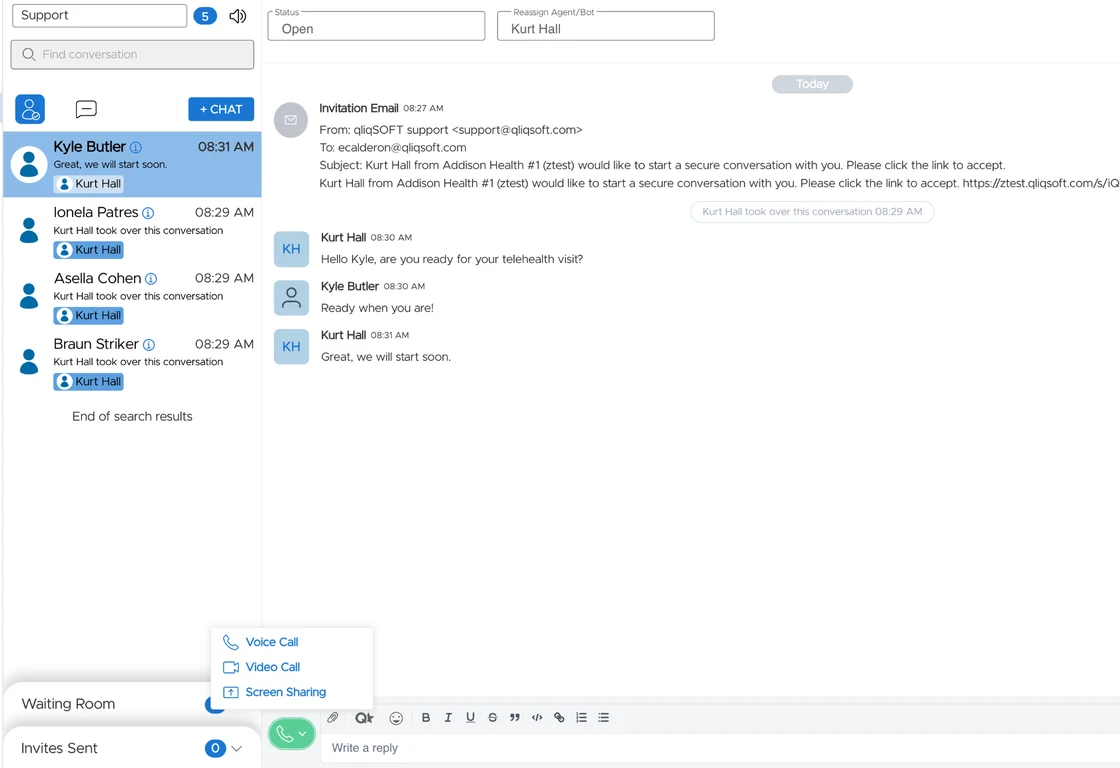
- ✓Cleaner conversation view layout.The QuincyCHAT conversation view has been reorganized to make commonly used actions easier to find. Administrative tools remain in the header, while patient-facing actions such as starting a video call or screen sharing are now grouped in a dedicated menu. All existing functionality remains available; only the layout has changed.
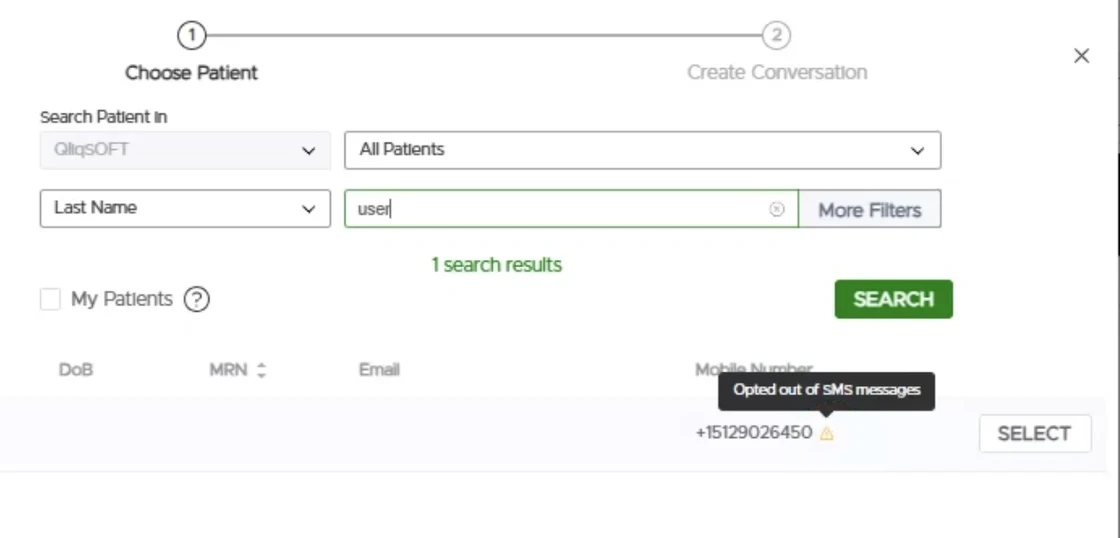
- ✓Patient opt-out status visible when sending a +Chat invitation.Agents can now see whether a patient has opted out of a communication channel directly from the +Chat invitation screen. This makes it easier to choose an appropriate communication method before sending an invitation.
- ✓Download or print completed Quincy Tasks and Quick Todos as PDF.Completed Quincy Tasks and Quick Todos can now be downloaded or printed as PDFs for documentation and record-keeping. PDFs include checklist details, completion status, timestamps, responses, and supported attachments.
- ✓Getting Started - interactive onboarding for QuincyCHAT agents.New agents now have access to an interactive, self-guided introduction to QuincyCHAT. The experience covers key features such as starting conversations, secure messaging, forms, eSign, bots, video visits, and productivity tools. Agents can complete the walkthrough at their own pace and return to it as needed.
- ✓Language selection messages now show the full language name.Translation system messages now display the full language name, such as “Ukrainian” or “English (US),” instead of language codes.
Bug fixes
- ✓Virtual backgrounds work again in video calls.Virtual backgrounds now apply correctly during QuincyCHAT video calls.
- ✓Patient search works with partial phone numbers.Patient searches in the +Chat workflow now support partial phone number searches, making it easier to find patients without entering their complete number.
Chat Widgets
What's new
- ✓Share one SMS number across multiple chat widgets.Organizations can now use the same SMS number across multiple chat widgets instead of purchasing and registering a separate number for each widget. Administrators can select an existing organization number when configuring a widget, and shared numbers are clearly identified.Replies sent to a shared number are routed to the sender's most recent conversation associated with that number. If no matching conversation is found, an automatic response can direct the sender to the secure chat experience. Shared number activity is also recorded in the audit log.
- ✓Branded bereavement ebook library with a book-style reader.Organizations subscribed to the Content Library can now create a branded version of the 20-book bereavement support library. Organizations can customize the books with their logo, organization name, website, support hours, and SMS contact information.The ebooks can be accessed through an enhanced reading experience with page-by-page navigation, chapter navigation, reading progress, adjustable font sizes, and light, dark, and sepia display options.
Improvements
- ✓Opt-in requests can now be delivered by phone call.Chat widget opt-in requests can now be sent by text message or delivered through an automated phone call. When delivered by phone, the configured opt-in message is read aloud in the patient's language, followed by simple instructions to press 1 to opt in or 2 to opt out.Opt-in status is shared across communication channels. A patient who opts out by phone will no longer receive messages, just as if they had replied STOP by SMS. A phone opt-in also allows SMS messages to be sent. If a patient does not respond, the existing widget settings for unanswered opt-in requests continue to apply.
Bug fixes
- ✓Copying a chat widget now carries over all configured text.When duplicating a chat widget, configured text such as welcome, away, and compliance messages, terms and conditions, help content, and SMS notification messages are now copied to the new widget. This makes it easier to create similar widgets without re-entering the same information.
Quincy eSign
What's new
- ✓Quick Sign is now Quincy eSign.Quick Sign has been renamed Quincy eSign to align with the Quincy product family. The new name appears throughout the platform, including navigation, page titles, settings, notifications, reports, and exports. Existing templates, documents, signatures, links, and workflows will continue to work as expected.
Improvements
- ✓Add a Purpose to Quincy eSign templates.Templates can now include a Purpose, which provides a short description of what the document is for. Purposes can be selected from a shared list or created when building a template or uploading a document. The Purpose can also be included in supported outgoing messages using a new placeholder, helping recipients understand why they are being asked to sign.
- ✓Copy and paste multiple fields at once.Template builders can now select multiple fields and checkboxes, copy them as a group, and paste them while maintaining the original layout. This makes it easier to create repeating sections and layouts.
- ✓Checkbox requirements are always visible when signing.Patients completing a Quincy eSign document can now see the selection requirements for checkbox groups throughout the signing experience, such as whether they can select only one option or whether all options are required.
- ✓Date-and-time field for Quincy eSign documents.Template builders can now add a field that captures both the date and exact time a document is signed or completed. The timestamp is displayed in the completed document and exported PDF using the group's configured time zone.
- ✓Alignment guides when resizing fields.Alignment guides now appear when resizing fields in the Quincy eSign editor, making it easier to size and align fields consistently.
Bug fixes
- ✓Improved keyboard navigation when signing.Pressing the Tab key while completing a Quincy eSign document now moves through fields in the correct visual order, making it easier to complete documents using the keyboard.
- ✓Signed field values now appear in the correct position in PDFs.Completed Quincy eSign PDFs now display signatures, dates, and other field values in their intended locations, including documents created from PDFs with rotated pages.
Quincy Forms
What's new
- ✓Quick Forms is now Quincy Forms.Quick Forms has been renamed Quincy Forms to align with the Quincy product family. The new name appears throughout the platform, including navigation, page titles, settings, notifications, reports, and exports. Existing forms, templates, submissions, links, and workflows will continue to work as expected.
- ✓Insurance card uploads can automatically populate form fields.Patients can now upload a photo of their insurance card and have available information automatically populate matching fields in the form. Supported information may include payer and plan details, member and group numbers, pharmacy information, copays, and contact numbers. Patients can review and edit any automatically populated information before submitting the form. Information that may require confirmation is highlighted, and manual corrections are preserved if the insurance card is uploaded again. If an image cannot be read, patients can continue completing the form manually. A ready-made Insurance Card subform is also available for organizations that want to quickly add this functionality to an existing form.
Improvements
- ✓Automatic deletion of older form submissions.Organizations can now configure automatic deletion of older form submissions based on their data-retention requirements. Administrators can choose how long submissions should be retained before they are permanently deleted. The feature is disabled by default and requires confirmation before being enabled. Activity related to retention settings and deletion runs is recorded in the Activity Log.
- ✓Scored forms can now be edited after submissions are received.Scored forms can now be updated even after submissions have been received. When changes are saved, a new version of the form is created. Previous submissions retain the scoring rules that were in place when they were completed, while new submissions use the updated configuration.
- ✓More compact Quincy Forms layout.Quincy Forms now use a more compact layout, making forms easier to review and reducing scrolling, especially on mobile devices and within embedded chat widgets.
- ✓See where a Quincy Form is being used.Administrators can now see where a form is being used before editing or removing it. A usage indicator shows when a form is referenced, with details about the bots and message sequences using the form.
Care Campaigns
Improvements
- ✓Preferred communication method for patient notifications.Organizations can now specify how each patient prefers to be contacted: Email, Mobile Number, or Both. Care Campaigns, One-Time Campaigns, and Automated Campaigns can use this preference when determining how notifications are delivered. In +Chat, the patient's preferred channel is automatically selected when starting a conversation, while staff can still change it when needed. The preference can also be managed through patient records, CSV imports, SFTP imports, and supported Quincy API workflows.
User Management
Improvements
- ✓Administrators can control the QliqCHAT Windows app update prompt.Organization administrators can now control whether Windows users are prompted to update the QliqCHAT desktop application directly from Security Settings → QliqCHAT App Settings.
Bug fixes
- ✓User removal is now available consistently for eligible users.Group administrators can now remove eligible users from their organization consistently, including duplicate accounts that previously could not be removed.
Reporting
Bug fixes
- ✓Date filters restored for Group and Broadcast message activity.The Group and Broadcast tabs of the Message Activity report now include the same date filtering available on the Individual tab, including quick-select time ranges, custom date ranges, and a Reset Filters option.
QliqCHAT 3.3.597 · July 14, 2026
Desktop app
What's new
- ✓QliqCHAT is now in the Microsoft Store.Windows users can download and install QliqCHAT directly from the Microsoft Store for a seamless installation experience.
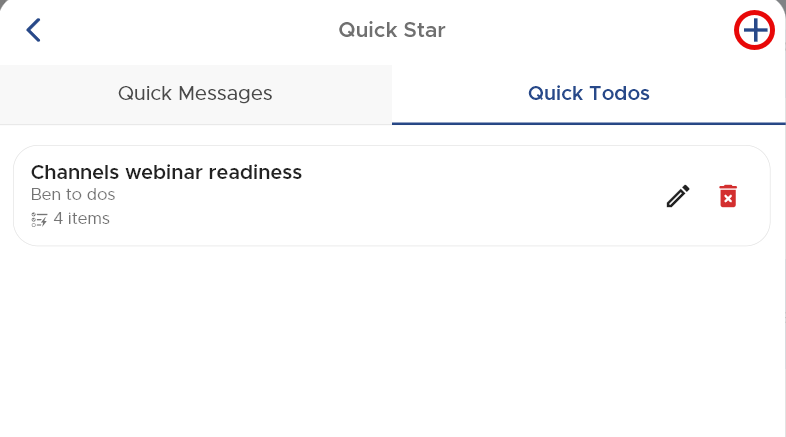
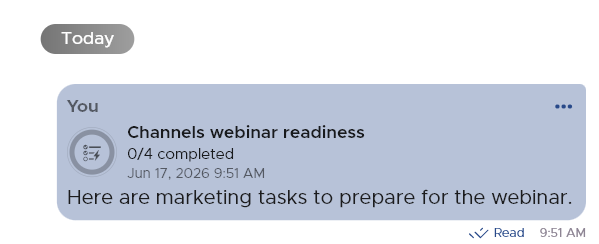
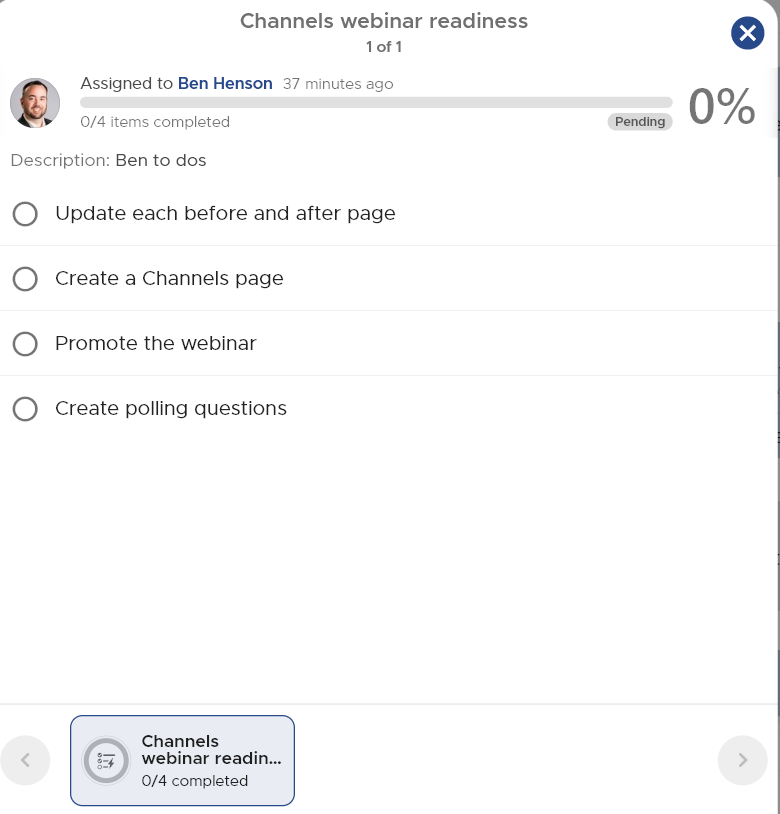
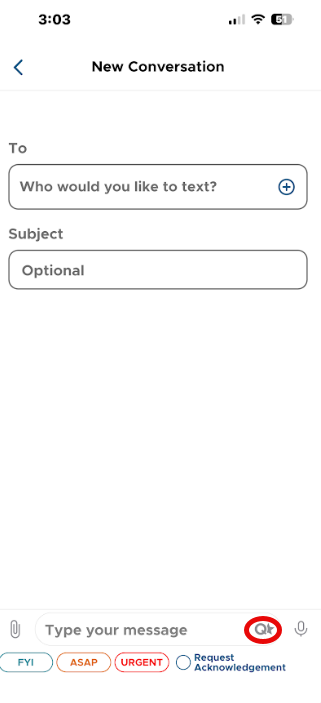
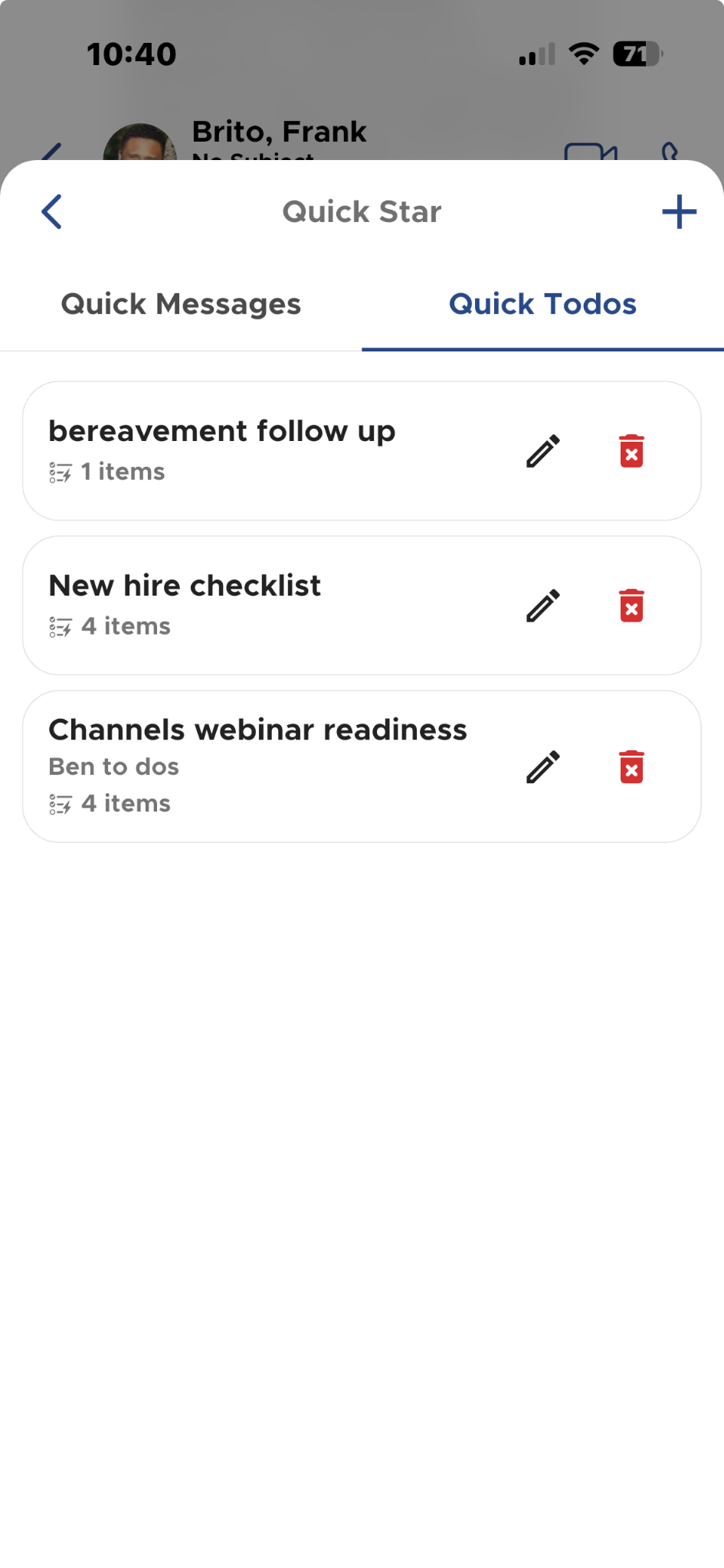
- ✓Quick Todos.Send simple checklists directly from chat using the new Quick Star (Q + star) composer menu, which replaces the old QM icon and groups Quick Messages and Quick Todos. Quick Todos work in both 1:1 and group conversations; in group chats, each participant gets their own checklist instance with per-person progress visible to all. QliqCHAT delivers in-app notifications when the app is open and push notifications when it runs in the background.

Improvements
- ✓The View More button on long messages is more visible in both light and dark schemes.
- ✓Scrolling a CSV preview with the mouse no longer changes the zoom level on desktop.
Bug fixes
- ✓PDFs can now be saved in QliqCHAT on Mac, and log download works on macOS (Settings, Support, Report Error).
- ✓The QliqCHAT icon initializes and displays correctly on first launch after a desktop update.
- ✓Replying to a text-message attachment with another attachment no longer errors.
- ✓Improved performance and cross-device syncing: messages send and sync promptly without reinstalls.
Mobile app
What's new
- ✓Quick Todos on mobile.The same checklist workflow arrives on iOS and Android, with per-person progress in group chats and notifications covering Todo assignment and completion.
Improvements and fixes
- ✓Pinch-to-zoom works on JPG attachment previews; the View More button is more visible.
- ✓Fixed infinite loading after app launch, attachment-reply errors, and cross-device sync delays; battery optimization status in Device Settings now reflects the Android system setting.
Visit Path
SOS: three-option escalation from the home screen
What's new
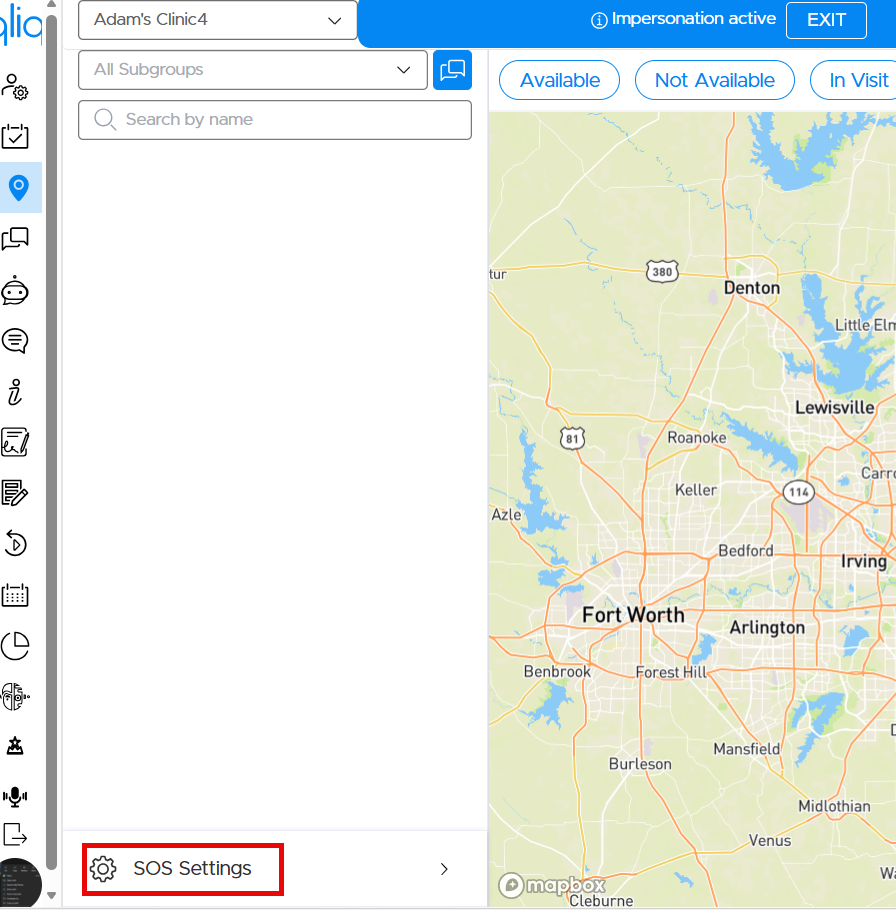
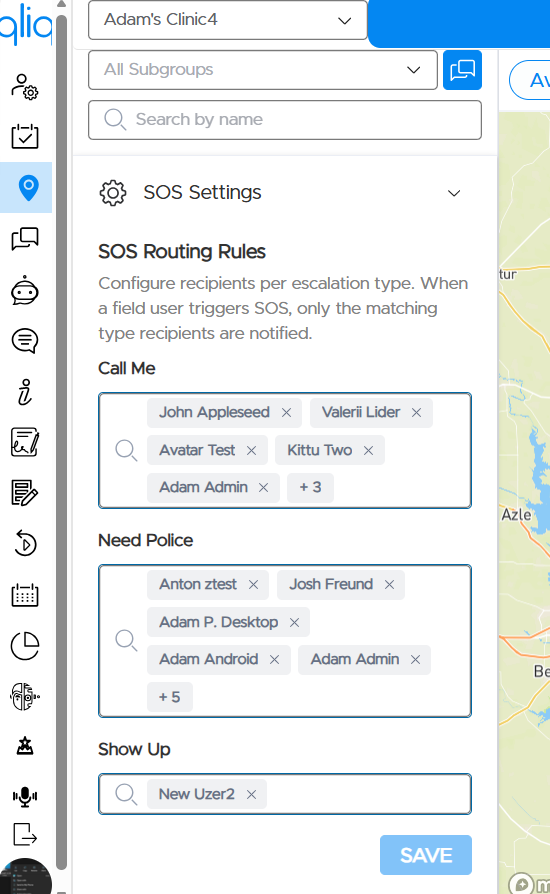
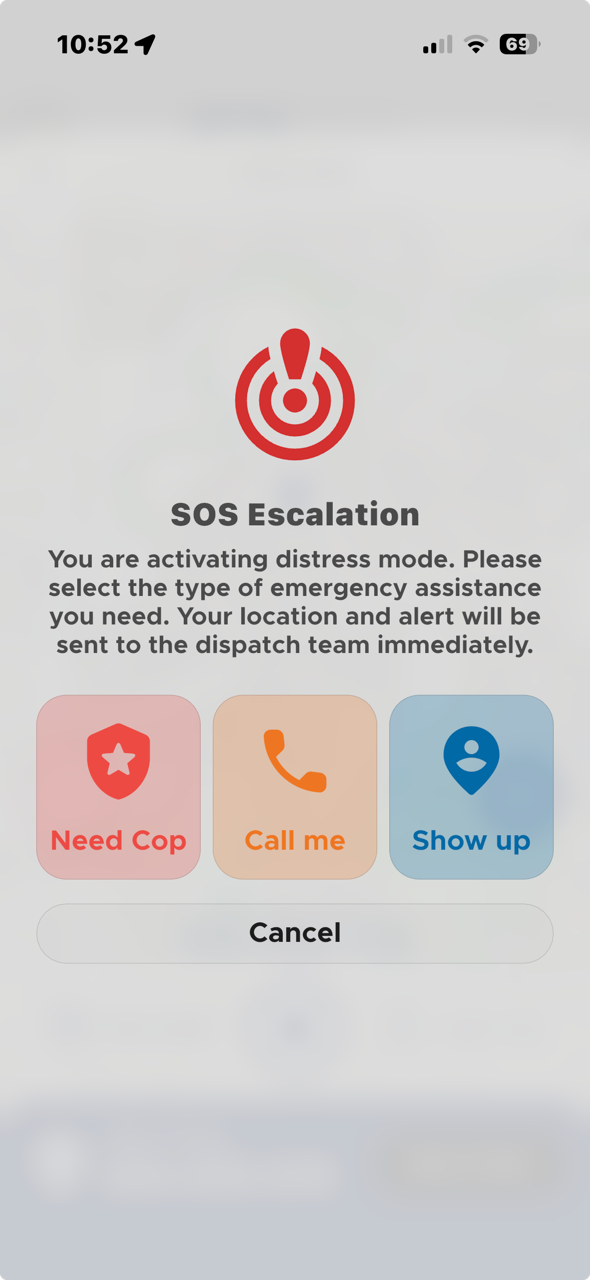
- ✓Three-option SOS escalation.Field workers can now escalate distress more precisely and faster. The in-app SOS prompt is replaced by a three-option modal (Need Cop, Call me, Show up), and group admins configure separate routing recipients per escalation type under Quincy, Visit Path, SOS Settings. A new home-screen widget and lock-screen surface (iOS 17+ Live Activity with Dynamic Island support; Android 8.0+ ongoing notification) puts the three SOS buttons on the device home and lock screens, so a field worker can trigger help without unlocking the phone or opening the app.
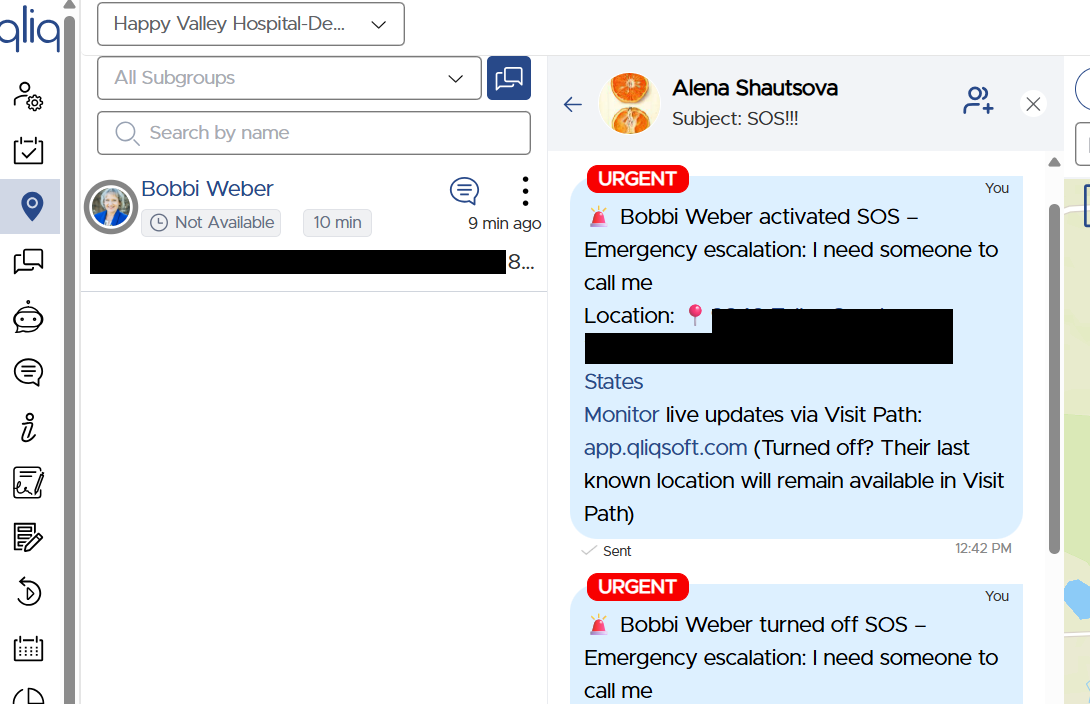
- ✓No visible distress indicator.Deliberately, no surface displays a persistent distress-active indicator: buttons return to their idle appearance after activation, and the active state is reflected only inside the app on the Visit Path screen. This is a security choice, so a person under observation does not signal at a glance that they have called for help.
Also in this release
Fill & Sign and Admin
- ✓Fill & Sign:the Upload to QliqSTOR toggle is now visible in the OFF state in dark mode on iOS.
- ✓Reporting:on the Secure Messaging Dashboard and Message Activity pages, the All time-range filter is replaced with a 6 Months filter to keep queries fast; other filters (24 hours, 7/30 days, 3 months, custom range) are unchanged.
Release archive
Previous releases (PDF)
June 22, 2026 →
March 26, 2026 →
February 11, 2026 →
January 2, 2026 →
December 24, 2025 →
November 12, 2025 →
October 30, 2025 →
September 17, 2025 →
July 22, 2025 →
June 30, 2025 →
May 29, 2025 →
April 17, 2025 →
Component archives
See the platform behind the releases
In a 30-minute demo mapped to your agency's workflows, intake, scheduling, between-visit monitoring, HHCAHPS readiness, we'll show you exactly where the numbers start to move.
Trusted by 1,000+ healthcare organizations since 2011